
You are using an out of date browser. It may not display this or other websites correctly.
You should upgrade or use an alternative browser.
You should upgrade or use an alternative browser.
3D Printed Ford Battery Case Help
- Thread starter WarbirdPhotog
- Start date

WarbirdPhotog
Senior Member
Quick update... The battery has been printed! I'm just starting the process of sanding. The photos below show the battery held together with tape inside until I can glue everything with the plastic welding glue. The 6v optima red top battery is inside as well, a perfect fit. Even held together with tape (thus the alignment issues), the lid snaps into place and makes everything really stable. The lid is removable so the battery can be changed.

I am reprinting one section that I had a slight issue with. But it's otherwise done printing.
Next up, sanding and gluing! Then comes painting to seal the outside and smooth out any micro 3D printing imperfections. I'll update as I go along.
The Ford logo comes off so it can be painted gold like the originals.
As a reminder, here's an original battery for reference.

I am reprinting one section that I had a slight issue with. But it's otherwise done printing.
Next up, sanding and gluing! Then comes painting to seal the outside and smooth out any micro 3D printing imperfections. I'll update as I go along.
The Ford logo comes off so it can be painted gold like the originals.
As a reminder, here's an original battery for reference.

deuce_roadster
Well-known member
Let us know when you figure it all out what it would cost us (with NO 3D printer) for the parts to glue one together.
Impressive work!
Thanks,
Mike aka deuce_roadster
Impressive work!
Thanks,
Mike aka deuce_roadster
WarbirdPhotog
Senior Member
you might want to address the issue of short projections of the poles. When i built my faux battery case, the total thickness of the top including the 3 cells was ¼".
I've tested them with the cables on (previously mentioned in this thread). The battery cables fully grab and are tight. I've shortened the width of the top cover as much as I can, even adding an indentation underneath the cover for the red top to go into. Making it any thinner would require it to not match the original height. Also, I don't have the cover pushed down all the way in that photo. There will be a bit more terminal sticking out once everything is sanded and glued to precise fitment.
I was worried about that at first, because the terminals on the red tops are not all that tall, but after testing with the lid and the actual battery cables I'll be using, I'm not worried about them not having enough to clamp.

russonator
Senior Member
I marvel at the work done by Warbird here. Not to hijack his thread, but are the correct "DO NOT REMOVE" vent caps available anywhere? The BCM repro LF battery for my '39 Standard came with the incorrect Ford script caps.

ford38v8
Well-known member
I marvel at the work done by Warbird here. Not to hijack his thread, but are the correct "DO NOT REMOVE" vent caps available anywhere? The BCM repro LF battery for my '39 Standard came with the incorrect Ford script caps.
This issue goes way back with other suppliers also. The script caps are apparently the default, so you have to specifically request the do not remove. Get hold of your supplier and make that request.

Old Redneck
Well-known member
I had bought a Scrip Battery for my 32 Ford and it only lasted for 3 years. They stop making them and I needed a Ford striped Battery for Marc Judging. I bought a Royal King Battery same size $80 dollars and cut the old Ford Battery up and use the side Ford scrip and glued it to the new battery and also use the caps and ford off the top of the Ford battery. It look perfect and had the 32 Judge for a Dearborn and it passed. This worked for my 32. A lot cheaper then paying another 300 dollars

WarbirdPhotog
Senior Member
Cost wise, I've maybe spent $50 on PETG filament to make this battery. That includes all of the failed/redo parts I've had to print along the way. The rest is my time, of course, designing and printing it, but it was a fun project (albeit frustrating many times!).
I'm actually redoing one area because I figured out a better way to print the star texture for that area. Once I get that printed, I'm going to start the gluing process. Hope to have another update in a day or two.
Looking to finish this project by early March.
I'm actually redoing one area because I figured out a better way to print the star texture for that area. Once I get that printed, I'm going to start the gluing process. Hope to have another update in a day or two.
Looking to finish this project by early March.

Seth Swoboda
Well-known member
This is very impressive. I'm assuming that the time involved would make reproducing your work for other cost prohibitive?

Model51
Well-known member
You have done an amazing job - Congratulations!
One thing I noticed is that your original battery appears to have the three top sections elevated above the plane of the battery case and at various angles. I suspect that the original battery has expanded lead plate cells causing the top covers to rise. I also noticed that your 3-d printed top has these three top covers above the plane of the battery case. In my experience, these three top covers are in the same plane as the top of the case. This may be the reason the Optima battery posts appear to be short. If there is clearance, lower the top three cover plates to the level of the battery case. I know this might not be possible since the Optima battery is often taller than the case. If you can make the top covers in the same plane as the battery case, then you will have taller battery posts from the Optima battery.
One thing I noticed is that your original battery appears to have the three top sections elevated above the plane of the battery case and at various angles. I suspect that the original battery has expanded lead plate cells causing the top covers to rise. I also noticed that your 3-d printed top has these three top covers above the plane of the battery case. In my experience, these three top covers are in the same plane as the top of the case. This may be the reason the Optima battery posts appear to be short. If there is clearance, lower the top three cover plates to the level of the battery case. I know this might not be possible since the Optima battery is often taller than the case. If you can make the top covers in the same plane as the battery case, then you will have taller battery posts from the Optima battery.
Old Redneck
Well-known member
The 32 small battery is too small for a optima battery. I could not find one to fit the 32 battery case. That the reason Bought a battery at Royal King that the same size as a 32 battery.

The Art Doctor
Senior Member
This is very impressive. I'm assuming that the time involved would make reproducing your work for other cost prohibitive?
There are online places that will print up the files for you in quantity and ship them to your door. Just one example: https://jlc3dp.com/ It could be sold as a kit requiring assembly and final finishing by the end user so only packaging and shipping would be the issue after having the investment of having it all printed. If you have your own printer he could sell you/anyone a copy of the file and you could print your own, creating the file is where the hard work was. The trick in that case is protecting the file so it cannot be shared around for free by a purchaser, that coding is beyond my skill set. If profit is not the driving force anyone could print one out if the files were available on a shared file site of which there are over a dozen where altruistic folks share what they have done.
I find business related things like this very interesting, I did not grow up in a family business but have been forever curious about how things are made and brought to market. I think the study of the marketplace, manufacturing, pricing and potential sales of a niche item like this would be fascinating. Do you sell it yourself one at a time or ship them off to vendors by the crate and let them take a cut to advertise and find ready customers for your product. I wish I had time/drive to go back and get a second degree, but I am too happy with what I do now to ever stop but still it is so interesting. Big companies spend millions researching that information to make billions. So then how is one guy going to sell a few home made plastic boxes to a few old guys going to make anything for his time and effort, can he? does he want to? so fun to run scenarios.
BTW I love this project and your finished product so far looks really good to me.
ford38v8
Well-known member
Art Doctor, copyright infringement laws and licensing comes into play here. I think there is a legal work-around to all that, but Ford has the money and time to put into a legal fight that no individual can compete with. Obtaining the license from Ford is not cheap, but likely the best route to take.

WarbirdPhotog
Senior Member
Big update: The main box has been glued, sanded, primed, and painted!
Starting to see the light at the end of the tunnel. The side panels were a huge pain to 3d print. Aside from the size being too large for my printer to handle in one go, I had to split them up into 3 parts, then put them back together.
There end up being two issues:
1) The Star texture: this darn star texture has been the worst part of this whole project. Aside from it taking forever to figure out how to not only model the star texture, but also wrap it around the sides... I would say that took about 40% of the project. But the problem was how to print it. If you laid the sidewalls so they faced up (so the start texture is facing up), you end up getting layer lines instead of smooth lines on the start texture. So it looks like a topographical map. Even with a smaller .2mm nozzle, you still see some of the lines. See the image below... The top left piece had the Star texture printed on the side (standing up) and the bottom right piece had to start texture painted upwards (laying down):

So the better way to print it, is to have the walls standing up. So the star texture is printed on the side. This smooths out the layer lines and It makes them look beautiful. But, this leads to the next problem:
2) Warping: standing these long walls up meant at the bottom line will warp. As the bottom and the top of the walls cool at different rates, the 3D print slightly contracts and pulls up the bottom. This causes warping, a common problem with 3D printing. There are ways around it, like printing a brim around the edges at the bottom, using an actual glue stick to try and keep the 3D print from lifting, getting an enclosure for the 3D printer to keep the ambient air temperature the same, etc.

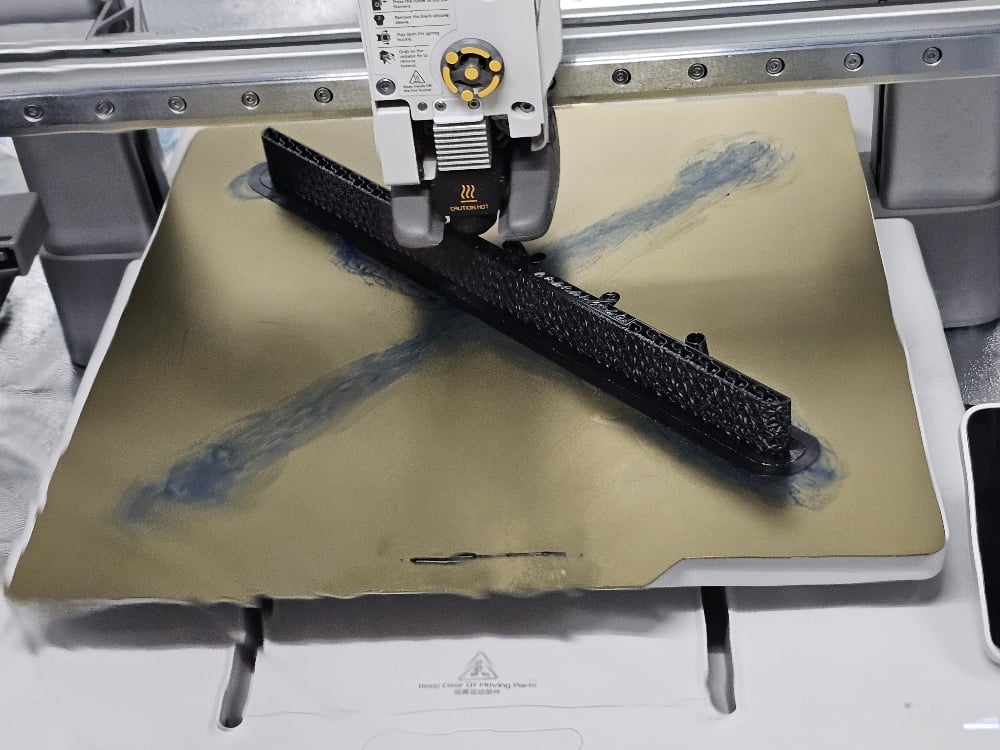
I tried all those things and some worked better than others. I probably printed 10 of the side wall pieces before I was able to get the settings tuned in just right to minimize warping to negligible amounts.

So with everything printed, I was finally able to glue it all together using JB plastic weld glue. This glue works really well at fusing 3D prints together. An incredibly strong bond.


Once the side walls were glued together to form the full side walls, I was then able to glue down all four walls to the base.

After that, I started sanding to smooth out any 3D printing layer lines that were left. Once that was done, I cleaned the entire case and hit it with filler primer which helped smooth out any small imperfections.
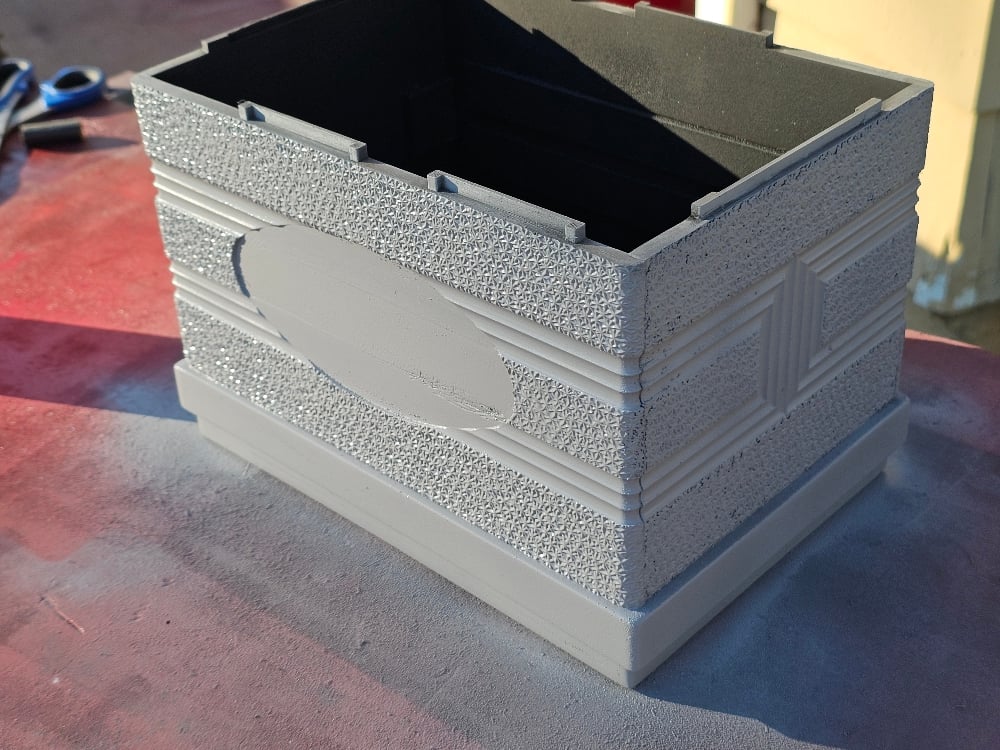

Finally, I was able to spray it with an extremely matte black spray paint to finish it.

Next up, the final part. I need to spray the Ford logo gold. I printed an insert for the Ford logo that goes inside that should keep the inside black and just make the outside gold. I'll remove that insert once it's painted.

Addressing the terminals at the top. There are enough terminals sticking out to make very good very strong connections with the battery cables. I'm not too concerned about that. But, I do realize now that most of the photos I have seen of these 1940 Ford batteries have the slightly swollen cells at the top. So somebody mentioned that it should actually be flat technically. That would actually give another .25 inch of terminals. Since my top is already finished and painted, I'm probably not going to redo it for now. I'll redo the 3d model itself so the cells aren't swollen, and it might be something I eventually reprint, but I don't mind the slightly swollen look since most 1940 batteries I've seen look like that nowadays. And it would be a lot of extra work!
Starting to see the light at the end of the tunnel. The side panels were a huge pain to 3d print. Aside from the size being too large for my printer to handle in one go, I had to split them up into 3 parts, then put them back together.
There end up being two issues:
1) The Star texture: this darn star texture has been the worst part of this whole project. Aside from it taking forever to figure out how to not only model the star texture, but also wrap it around the sides... I would say that took about 40% of the project. But the problem was how to print it. If you laid the sidewalls so they faced up (so the start texture is facing up), you end up getting layer lines instead of smooth lines on the start texture. So it looks like a topographical map. Even with a smaller .2mm nozzle, you still see some of the lines. See the image below... The top left piece had the Star texture printed on the side (standing up) and the bottom right piece had to start texture painted upwards (laying down):
So the better way to print it, is to have the walls standing up. So the star texture is printed on the side. This smooths out the layer lines and It makes them look beautiful. But, this leads to the next problem:
2) Warping: standing these long walls up meant at the bottom line will warp. As the bottom and the top of the walls cool at different rates, the 3D print slightly contracts and pulls up the bottom. This causes warping, a common problem with 3D printing. There are ways around it, like printing a brim around the edges at the bottom, using an actual glue stick to try and keep the 3D print from lifting, getting an enclosure for the 3D printer to keep the ambient air temperature the same, etc.
I tried all those things and some worked better than others. I probably printed 10 of the side wall pieces before I was able to get the settings tuned in just right to minimize warping to negligible amounts.
So with everything printed, I was finally able to glue it all together using JB plastic weld glue. This glue works really well at fusing 3D prints together. An incredibly strong bond.
Once the side walls were glued together to form the full side walls, I was then able to glue down all four walls to the base.
After that, I started sanding to smooth out any 3D printing layer lines that were left. Once that was done, I cleaned the entire case and hit it with filler primer which helped smooth out any small imperfections.
Finally, I was able to spray it with an extremely matte black spray paint to finish it.
Next up, the final part. I need to spray the Ford logo gold. I printed an insert for the Ford logo that goes inside that should keep the inside black and just make the outside gold. I'll remove that insert once it's painted.
Addressing the terminals at the top. There are enough terminals sticking out to make very good very strong connections with the battery cables. I'm not too concerned about that. But, I do realize now that most of the photos I have seen of these 1940 Ford batteries have the slightly swollen cells at the top. So somebody mentioned that it should actually be flat technically. That would actually give another .25 inch of terminals. Since my top is already finished and painted, I'm probably not going to redo it for now. I'll redo the 3d model itself so the cells aren't swollen, and it might be something I eventually reprint, but I don't mind the slightly swollen look since most 1940 batteries I've seen look like that nowadays. And it would be a lot of extra work!

WarbirdPhotog
Senior Member
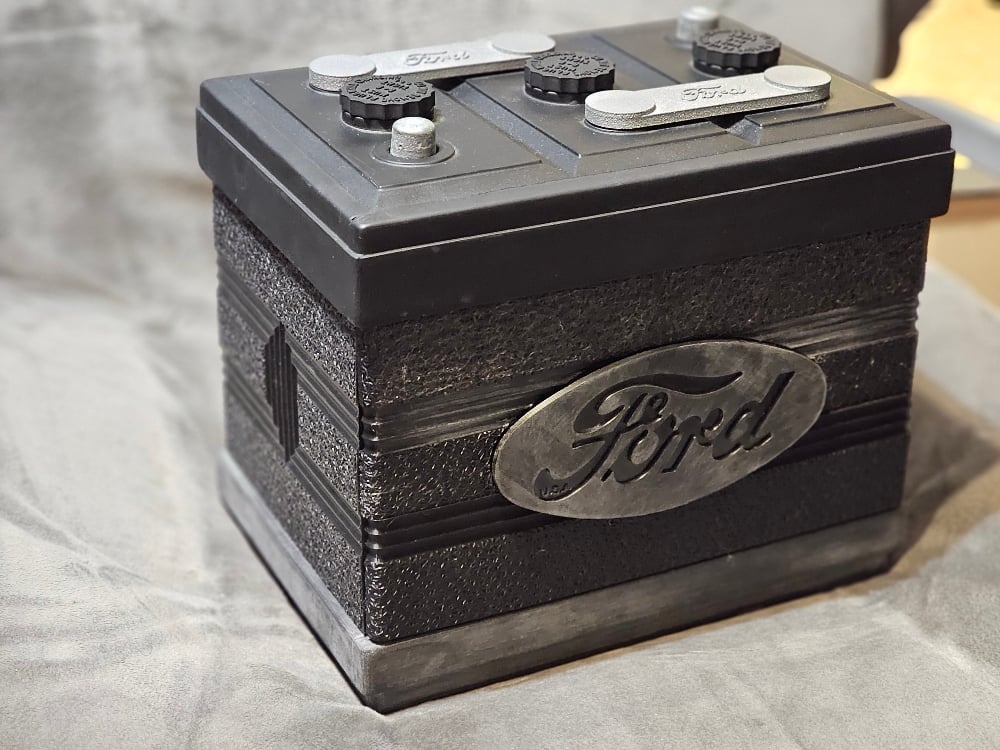
Okay, here's the BIG update! I meant to post it a two weeks ago when I actually finished, but life has been crazy. The 3D printed 1940 Ford Battery is DONE and ready to be installed (well, once the car is ready).
It's taken about a year of on/off again work, lots of failed/wrong prints, lots of re-tinkering, printing, more printing, fitting, sanding, and painting. All the photos below are of the finished battery.


The texture is spot on with the original 'star texture', as I call it. I even used the same seam as the original battery (which was super helpful).

The top cell connectors are painted in a way that makes them look cast metal. It even has the ever so slight raised/lowered stamping marks for the Ford Logo like on the original. (The top got a little dusty from waiting for the rest of it to be done!)

I couldn't find any really good original photos of the gold painting on the Ford logo, so I went with what I had from Kube's book which was this matte gold rather than a super reflective gold. Looks pretty good. It was a PAIN to paint though. I had to print the Ford logo as an insert to block the gold from going in the black areas.

The red-top Optima battery fits in perfectly. The only modification to it is to remove the little feet tabs. Otherwise, it fits like a glove (with some room to spare). The base acts as a platform to raise the optima to the correct height. No cut-outs at the bottom.

Now, one thing that has been suggested is that the three cells on top are raised a bit too high. This is due, from what I've been told, to the cells on the original battery (and photos I studied of original batteries) 'swelling' over time. They should be a bit more flat. That would actually give me a bit more terminal showing from the Optima. I may, sometime in the future, try printing the top again with the cell tops lowered, but it works well with plenty of grip for the terminal battery cable clamps for now.
So, I'm taking a break for a bit from this project before I decide how I want to proceed with it. Naturally, I can't sell them with the Ford logo, which defeats the point.
Here's a look at all the failed prints, things that ended up being off, sides that warped from uneven cooling, my quest to perfect the star texture, etc. Probably about a reel and a quarter's worth of filament here:

I hope you enjoyed taking a look at this fun journey! Lots of frustrations along the way, but also learned a lot. Once I can focus on some other projects (including the car itself), I'll announce what I'm going to do with the 3D files for the project. And I want to borrow the original battery again so I can do side-by-side photos.
It's taken about a year of on/off again work, lots of failed/wrong prints, lots of re-tinkering, printing, more printing, fitting, sanding, and painting. All the photos below are of the finished battery.
The texture is spot on with the original 'star texture', as I call it. I even used the same seam as the original battery (which was super helpful).
The top cell connectors are painted in a way that makes them look cast metal. It even has the ever so slight raised/lowered stamping marks for the Ford Logo like on the original. (The top got a little dusty from waiting for the rest of it to be done!)
I couldn't find any really good original photos of the gold painting on the Ford logo, so I went with what I had from Kube's book which was this matte gold rather than a super reflective gold. Looks pretty good. It was a PAIN to paint though. I had to print the Ford logo as an insert to block the gold from going in the black areas.
The red-top Optima battery fits in perfectly. The only modification to it is to remove the little feet tabs. Otherwise, it fits like a glove (with some room to spare). The base acts as a platform to raise the optima to the correct height. No cut-outs at the bottom.
Now, one thing that has been suggested is that the three cells on top are raised a bit too high. This is due, from what I've been told, to the cells on the original battery (and photos I studied of original batteries) 'swelling' over time. They should be a bit more flat. That would actually give me a bit more terminal showing from the Optima. I may, sometime in the future, try printing the top again with the cell tops lowered, but it works well with plenty of grip for the terminal battery cable clamps for now.
So, I'm taking a break for a bit from this project before I decide how I want to proceed with it. Naturally, I can't sell them with the Ford logo, which defeats the point.
Here's a look at all the failed prints, things that ended up being off, sides that warped from uneven cooling, my quest to perfect the star texture, etc. Probably about a reel and a quarter's worth of filament here:
I hope you enjoyed taking a look at this fun journey! Lots of frustrations along the way, but also learned a lot. Once I can focus on some other projects (including the car itself), I'll announce what I'm going to do with the 3D files for the project. And I want to borrow the original battery again so I can do side-by-side photos.